How to Install Fabric for Minecraft (2026 Guide) – The Modern Way to Mod
Let’s be real: If you are still playing Vanilla Minecraft without mods in 2026, you are leaving massive performance gains on the table.
For the longest time, Forge was the undisputed king of modding. But in recent years, a new challenger took the crown for speed and optimization: the Fabric Mod Loader.
Why is everyone switching? It’s simple. Fabric is lightweight, it updates almost instantly when Mojang drops a new snapshot, and it is the home of legendary performance mods like Sodium and Iris (which replace OptiFine). If you want your game to load in seconds and look beautiful without destroying your frame rate, you need Fabric.
Ready to supercharge your block game? Here is your step-by-step guide on how to install Fabric for Minecraft.
Before You Start
Before we touch any files, let’s make sure your PC is ready. This saves you from the headache of error codes later.
Java is Key: Minecraft runs on Java. Make sure you have the latest version installed for your operating system.
Run Vanilla First: If you are trying to mod a specific version (e.g., 1.21.4 or 1.22), open your official Minecraft Launcher, select that version, and hit Play once. This downloads the base assets. Once it loads the main menu, quit the game.
Part 1: Installing the Fabric Loader (The Engine)
The Fabric Mod Loader is the “engine” that allows your game to read custom code. Installing it is incredibly easy compared to the old days.
Go to the Source: Navigate to the bottom of this page and download Fabric Launcher.
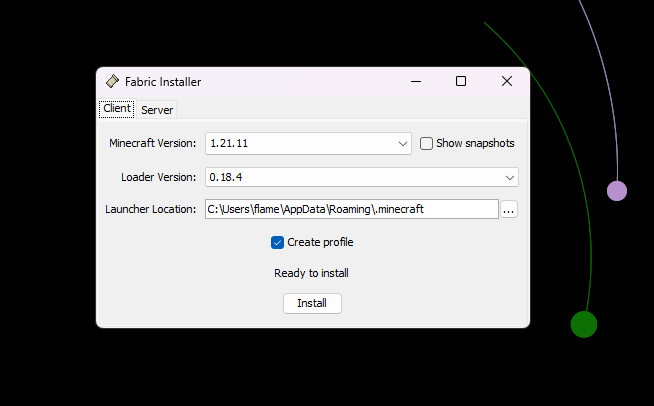
Run the Installer: Double-click the file you just downloaded. A small, clean window will pop up.
Configure Settings:
Minecraft Version: Select the version you want to play (e.g., 1.21.x).
Loader Version: Keep this on the default (latest).
Create Profile: Make sure this box is checked.
Install: Click the Install button. Within seconds, you should see a pop-up saying it has successfully installed.
Version Compability
Fabric is fully compatible with Java Edition versions from 1.14 up to the latest 1.21.x
The Vital Step – Fabric API (Don’t Skip This!)
STOP! Read this section carefully.
90% of the comments I get asking “Why did my game crash?” happen because they skipped this step. The Installer you just ran is the Engine, but the Fabric API is the Fuel. Most mods, including minimaps and optimization tools, will not work without the Fabric API library.
Download Fabric API: Go to Modrinth or CurseForge and search for “Fabric API”.
Pro Tip: Ensure the file version matches your Minecraft version (e.g., if you installed Fabric for 1.21, download Fabric API for 1.21).
Locate Your Mods Folder:
Windows: Press
Win + R, type%appdata%, and hit Enter. Open the.minecraftfolder.Mac: Open Finder, click “Go” in the top bar, hold “Option”, click “Library”, then navigate to
Application Support/minecraft.
The Drop: Open the
modsfolder. If it doesn’t exist, right-click and create a new folder namedmods(all lowercase).Paste the File: Drag and drop the Fabric API .jar file into this folder.
How to Add Mods & Launch
Now that the foundation is laid, you can add the fun stuff.
1. Finding Mods
Since you are using Fabric, you must download mods specifically built for it. When browsing Modrinth or CurseForge, always filter by “Fabric”. Popular starter mods include:
Sodium: Drastically boosts FPS.
Iris: Allows you to run Shaders.
Lithium: Optimizes game physics.
2. Installation
Just like the API, take your downloaded mod .jar files and drop them into that same %appdata%/.minecraft/mods folder.
3. Launching the Game
Open your Minecraft Launcher.
Look at the version selector (bottom left). You should see a new profile named “Fabric Loader [version]”.
Select it and hit Play.
Once the Main Menu loads, look at the bottom left corner. It should say “Fabric (Modded)”.
My Honest Opinion: Fabric vs. Forge
As someone who has been modding since the early Beta days, here is my take on the Fabric vs. Forge debate in 2026:
Choose Fabric If: You want a “Vanilla+” experience. You want your game to run at 500+ FPS, you want beautiful Shaders, and you want quality-of-life tweaks (like Minimaps or Inventory sorters) without changing the core game too much. For 99% of players, Fabric is the better daily driver.
Choose Forge/NeoForge If: You want massive, heavy content packs. If you want to build nuclear reactors, fly dragons, or play modpacks with 300+ new items, Forge is still the heavyweight champion for complex content mods.
- Fabric is a trademark of the Fabric Team. All credits for the loader go to the Fabric project developers.
- The link below directs you to the download from Official FABRICMC site AnvilPacks does not host these files.
FAQ: Troubleshooting
Q: My game crashed instantly with “Exit Code 1”. What do I do? A: This is the classic error. It usually means two things:
You forgot to install the Fabric API (see Part 2).
You downloaded a “Forge” version of a mod and put it in your Fabric folder. Check your files!
Q: Can I use OptiFine with Fabric? A: Technically, yes, using a mod called OptiFabric. However, I strongly advise against it. In 2026, the combo of Sodium + Iris provides significantly better performance and Shader compatibility than OptiFine ever did.
Q: Is Fabric safe? A: Yes, as long as you download the installer from the official fabricmc.net site and mods from trusted sources like Modrinth or CurseForge. Never download .exe mod files from random websites.
Fabric Download LINKS
Popular Texture Packs

XRay Texture Pack
Fresh Animations Texture Pack
Bare Bones Texture Pack
Visible Ores Texture Pack
Minecraft Versions

1.21.X Texture Packs
1.20.X Texture Packs
1.19.X Texture Packs
1.18.X Texture Packs
Resolutions

8x Texture Packs

16x Texture Packs

32x Texture Packs

64x Texture Packs

128x Texture Packs

256x Texture Packs

512x Texture Packs