
Let’s be brutally honest. Minecraft Java Edition runs on spaghetti code.
It doesn’t matter if you have an RTX 4090 and a threadripper CPU. The vanilla game is horribly optimized. It stutters, it lags when loading chunks, and it utilizes about 5% of your expensive hardware.
Sodium fixes this.
This isn’t just a “settings tweak.” It is a free, open-source rendering engine replacement. It rips out the old, slow rendering code Mojang wrote 15 years ago and replaces it with modern, efficient code.
The Claim: This is not an optional mod. If you play Java Edition, installing Sodium is mandatory.
I’m not just saying “it feels faster.” The difference is mathematical.
Vanilla 1.21: On a mid-range PC, I was getting a shaky 45-55 FPS in a jungle biome.
With Sodium: That jumped to a stable 180-200 FPS.
We are talking about a 300% to 500% performance increase for most players. It saves old laptops from the e-waste bin.
High FPS doesn’t matter if the game freezes every time you turn around. Sodium fixes the “micro-stutters” (lag spikes) caused by the garbage collector. The game feels buttery smooth. Frame pacing is perfect.
In vanilla, flying with an Elytra is a nightmare because the world can’t load fast enough. With Sodium, chunks load almost instantly. You can actually see where you are going.
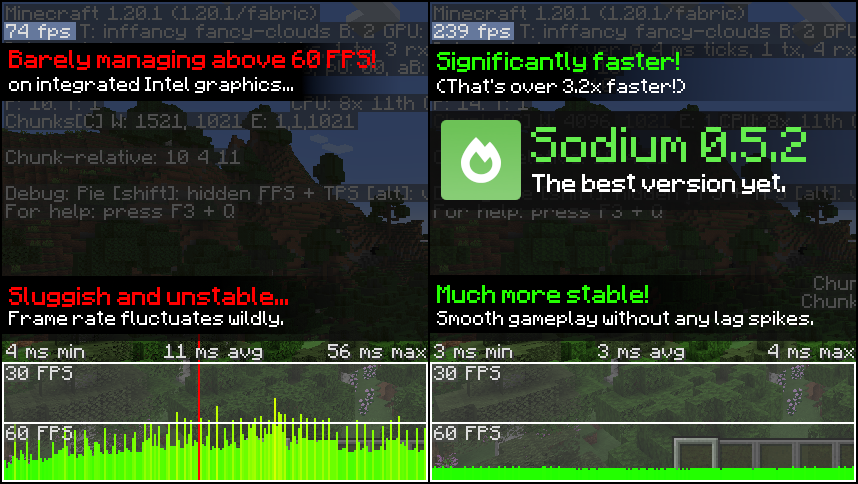
[image from official Sodium Website]
We all grew up with OptiFine. It was the king for a decade. But in 2026? It’s dead.
The Reality Check: OptiFine is closed-source, bloated, and surprisingly slow by modern standards. It modifies base code in ways that break other mods.
The Winner: Sodium destroys OptiFine in raw performance. It is lighter, faster, and more stable. If you are still using OptiFine just for “better FPS,” you are voluntarily slowing down your PC.
The “Missing” Features (Be Aware): However, Sodium is strictly a rendering engine.
Does it have Zoom? No.
Does it have Dynamic Lights (torch glowing in hand)? No.
Does it support Shaders? No (not by itself).
Don’t panic. You can get all these features back. You just need the “Ecosystem.”
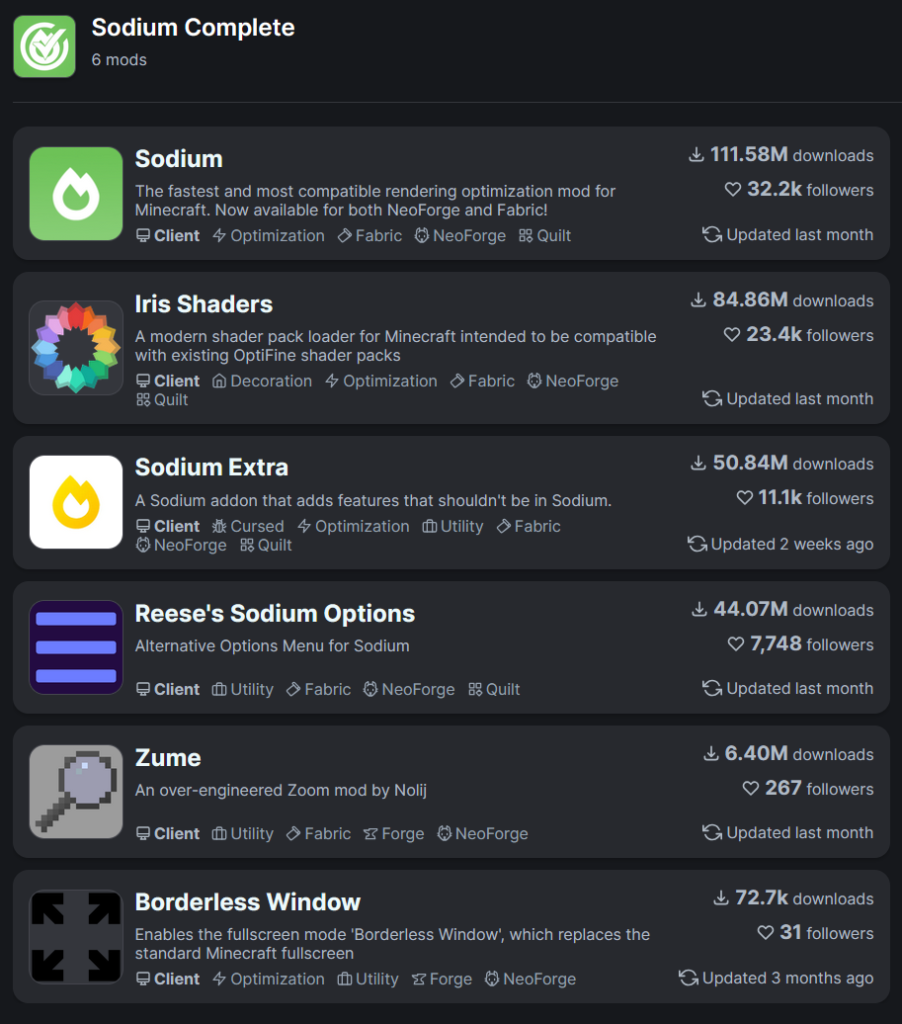
Sodium is the engine. To get the “OptiFine Experience,” you need to install a few extra mods alongside it. Think of them as the Avengers team.
Iris Shaders: This allows Sodium to run shaders (BSL, Complementary, etc.).
Indium: Essential for compatibility. It lets Sodium render complex modded blocks.
Zume: Adds the classic ‘C’ key zoom functionality.
LambDynamicLights: Adds the glowing torch-in-hand feature.
Reese’s Sodium Options: Cleans up the settings menu so it’s easier to read.
Sodium completely deletes the confusing vanilla “Video Settings” screen.
The UX Upgrade: Instead of a vague list, you get clean tabs: General, Quality, Performance, Advanced.
Tooltips: Hover over any setting, and it tells you exactly what it does and how much FPS it costs.
Real-Time Sliders: You can change Render Distance and Biome Blending without the game freezing for 3 seconds.
Watch our YouTube Video about this Pack.
Sodium is fully compatible with Java Edition versions from 1.16 up to the latest 1.21.x
I physically cannot play Vanilla Minecraft anymore.
When a new update comes out (like 1.22), I usually wait until Sodium is updated before I even start playing. Going back to vanilla feels like playing in slow motion. The input lag feels gross. The chunk popping is distracting.
Sodium makes Minecraft feel like a modern, professional game engine. It is the single best piece of code ever written for this community.
Install Fabric Loader: Download the installer from the official site.
Download Sodium: By clicking Download Button Below.
Drop it in: Put the .jar file into your %appdata%/.minecraft/mods folder.
Add Iris: If you want shaders, drop the Iris .jar in there too.
Launch: Select the Fabric profile in your launcher.

XRay Texture Pack
Fresh Animations Texture Pack
Bare Bones Texture Pack
Visible Ores Texture Pack

1.21.X Texture Packs
1.20.X Texture Packs
1.19.X Texture Packs
1.18.X Texture Packs

8x Texture Packs

16x Texture Packs

32x Texture Packs

64x Texture Packs

128x Texture Packs

256x Texture Packs

512x Texture Packs