NoFog
- Author: Tommeh2
- 5 January, 2026
- 16
No Fog Mod in Minecraft – Crystal Clear Views
Why You Need to Remove the Fog?
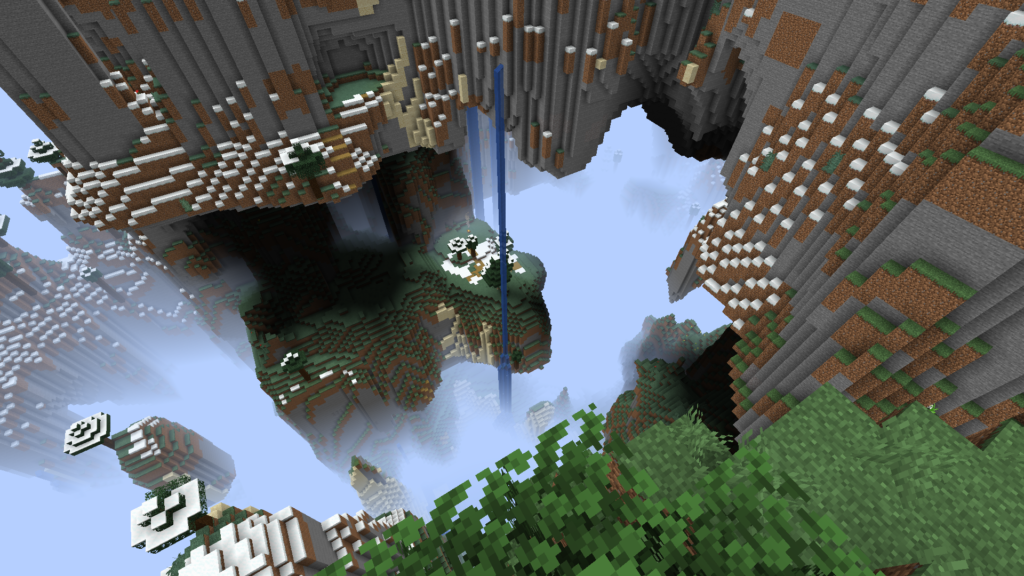
Let’s be real for a second. You finally built a PC that can handle 32 render distance. You climb to the top of your mega-base, look out at the horizon, and… what do you see? A giant, ugly, gray wall of mist.
That’s the default Minecraft fog. While it used to be necessary to hide chunk loading on old potatoes, in 2026, it often just gets in the way. Whether you are a builder trying to take the perfect screenshot or an explorer looking for a Jungle temple, that “milky wall” is annoying.
Here is why No Fog should be your next priority:
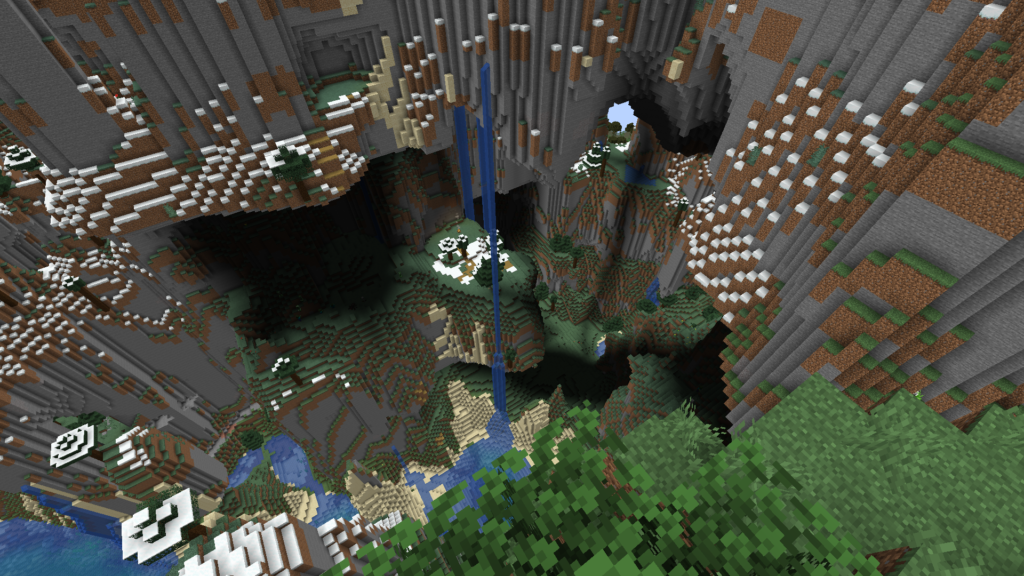
Crystal Clear Vision: You see exactly what your computer is rendering. No artificial limits, just crisp horizons.
Better Screenshots: If you are sharing builds on Reddit or Discord, you want your background to look vibrant, not washed out by gray soup.
Performance: While mostly aesthetic, stopping the game from rendering fog layers can slightly improve clarity without costing you FPS.
What Does This Mod Actually Do?
The No Fog mod is beautifully simple. It doesn’t add crazy items or change the combat mechanics. It just does one job, and it does it perfectly.
Here is the breakdown:
Universal Fog Removal: It doesn’t just work in the Overworld. It removes the thick red fog in the Nether (making fortress hunting way easier) and the dark void fog in the End.
Client-Side Only: This is huge. You can use this mod on almost any multiplayer server. Since it doesn’t give you an unfair advantage (like X-Ray) and only changes your visual perspective, it is generally safe to use.
Lightweight: The file size is literally just a few kilobytes. It won’t bloat your load times or eat up your RAM.
Version Compability
NoFog is fully compatible with Java Edition versions from 1.19.3 up to the latest 1.21.x
My Honest Opinion (Review).
Look, I’ve been playing Minecraft since the Alpha days. I used to think fog was atmospheric. But after installing the No Fog mod, I honestly can’t go back to Vanilla.
The game just feels “unlocked.” When you are in the Nether, being able to see a Bastion from hundreds of blocks away without squinting through red mist is a game-changer. It makes the world feel massive.
Pro-Tip: If you want the ultimate visual experience, pair this mod with Sodium (for FPS boost) and crank your render distance up to 32 chunks. The combination of high render distance + No Fog is absolutely stunning.
- Credits: Full credit for creating NoFog goes to the Tommeh2.
- Please note that none of the files are hosted on our servers — all Download Links redirect to the official Pack page to support the creator.
- Every mod is thoroughly checked and confirmed to be free from viruses, ensuring a completely safe and secure download experience for all users.
How to install NoFog
Ready to clear up your vision? Installing this is slightly different than using an installer like OptiFine, but don’t worry—it’s easy.
Prerequisite: You need a Mod Loader. We recommend Fabric for the best performance, but Forge versions are available too.
1. Install Your Mod Loader
If you haven’t already, download and install the Fabric Loader (or Forge) for your specific version of Minecraft (e.g., 1.21 or 1.22).
2. Download No Fog
Head over to the official source to get the file. You can do it by clicking “Download NoFog” under this section.
3. Download the API (Crucial Step!)
If you are using Fabric, the game will not launch without the API.
Download the Fabric API.
4. Locate Your Mods Folder
Now, let’s put the files in the right place:
Press
Win + Ron your keyboard.Type
%appdata%and hit Enter.Open the
.minecraftfolder.Open the
modsfolder. (If it doesn’t exist, just create a new folder named “mods”).
5. Drag & Drop
Take the No Fog .jar file AND the Fabric API .jar file you downloaded, and drag them both into that
modsfolder.6. Launch & See
Open your Minecraft Launcher, select your Fabric/Forge profile, and hit Play. Once you load into a world, you should notice the difference immediately.
NoFog Download Links
FAQ: Common Issues
Q: Does this work on servers? A: Yes! It is a client-side mod. You can use it on SMPs, Hypixel, or private servers. The server doesn’t need to have the mod installed for it to work for you.
Q: My game crashed on startup! What happened? A: 99% of the time, this is because you forgot the Fabric API. Go back to Step 3 and make sure you have the API jar file in your mods folder alongside the No Fog mod.
Q: Can I toggle the fog on and off? A: The base version of this mod is usually “always on.” If you want toggleable fog, you might need to look into a configuration menu mod (like Mod Menu) depending on the specific version of No Fog you downloaded.
Popular Texture Packs

XRay Texture Pack
Fresh Animations Texture Pack
Bare Bones Texture Pack
Visible Ores Texture Pack
Minecraft Versions

1.21.X Texture Packs
1.20.X Texture Packs
1.19.X Texture Packs
1.18.X Texture Packs
Resolutions

8x Texture Packs

16x Texture Packs

32x Texture Packs

64x Texture Packs

128x Texture Packs

256x Texture Packs

512x Texture Packs